
Mesh or extender? How to choose, and how many units you need
Extenders, mesh systems and access points all add a second source of Wi-Fi. What separates them is how they talk back to the router, and that decides how fast the far room will actually be.
In short
- The difference that matters is the link back to the router (the backhaul). A cable is best; a dedicated radio is good; sharing the same radio with your devices is the weakest.
- Basic single-band extenders receive and resend on the same channel, which can halve the speed they pass on. They suit one room in a small home.
- Mesh systems give you one network and handle switching between units, which matters in larger homes and on several floors.
- Count weak areas, not square metres. Most homes need one extra unit; each added wireless hop costs speed, so more isn't automatically better.
On this page
When moving the router isn't enough, you need a second source of Wi-Fi closer to the rooms that are weak. Shops sell three kinds of box for this: extenders, mesh systems and access points. They look similar and promise similar things, but they differ in one detail that decides almost everything: how the new unit gets its connection from the router.
The link back to the router decides the speed
Every extra unit has two jobs. It talks to your devices, and it talks to the router to fetch what they asked for. That second link is called the backhaul, and there are three ways to do it.
A cable. The unit is connected to the router with Ethernet and only uses its radios for your devices. Nothing is shared, nothing is halved, and the unit can sit anywhere a cable reaches, even behind a concrete wall. This is how access points work, and most mesh systems support it too.
A dedicated radio. Some mesh systems, often described as tri-band, have an extra radio used only to talk between units. Your devices and the backhaul don't compete for the same airtime. This is the best option without a cable.
The same radio your devices use. Basic single-band extenders, and dual-band mesh systems without a cable, use the same radio both to receive from the router and to talk to your devices. Since a radio can't do both at the same moment, the available speed is shared. Netgear itself notes that single-band extenders can reduce the available bandwidth by half.
So two boxes with the same number of antennas can give very different results in the far room, depending on which of these they use.
Extender, mesh or access point
An extender is the cheapest option. It's a sensible choice for one weak room in a small home, placed where it still receives the router well. Its limits are the shared backhaul described above and, with many models, a separate network name, which means phones won't move between it and the router by themselves. If yours creates a network called something like _EXT, see phone won't switch to the nearest node.
A mesh system replaces your router's Wi-Fi with a set of units that work as one network. You get one name everywhere, an app that shows how each unit is doing, and handover between units that's designed in rather than left to chance. In homes with several weak rooms, on more than one floor, or where people walk around during calls, it's usually worth the difference in price.
An access point is a single unit connected to the router by cable. It's the most reliable way to cover a far room or another floor, as long as a cable can get there. Many mesh systems can work the same way, with a cable to each unit, which gives you the best of both.
Powerline adapters with built-in Wi-Fi are a fourth route: the backhaul runs through the electrical wiring. They can work well through walls a radio can't cross, but the speed depends heavily on the wiring and the circuit, so buy them where you can return them.
How many units you need
Sizing charts that promise coverage per square metre ignore what actually limits Wi-Fi at home: walls, floors and where the router sits. A small flat with a concrete wall down the middle can need a second unit; a large open-plan house may not.
A better way to decide is to count the weak areas after you've moved the router to a good spot. Walk the home with a signal reading (how to check Wi-Fi signal strength on iPhone) and note where it drops below about -70 dBm. Weak rooms next to each other form one area, and one unit covers them. Separate areas, for example the far end of the ground floor and the whole upper floor, each need their own.
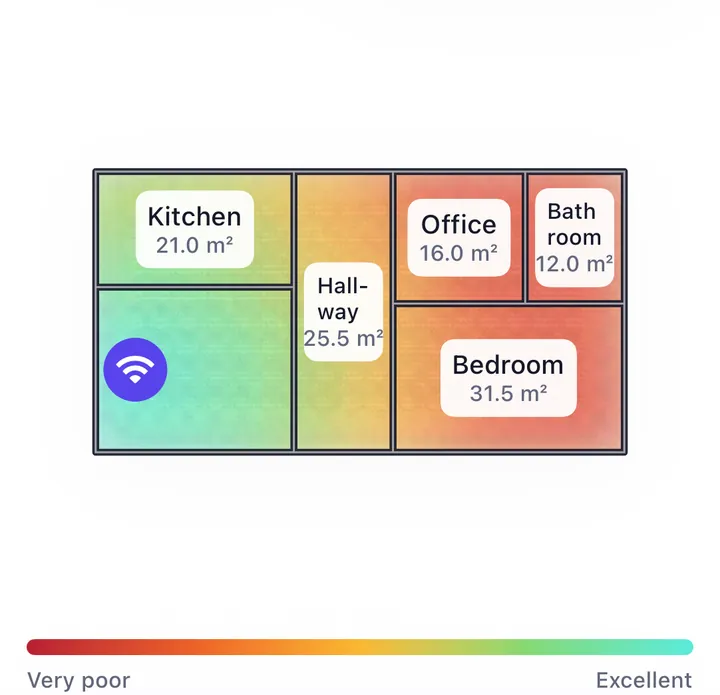
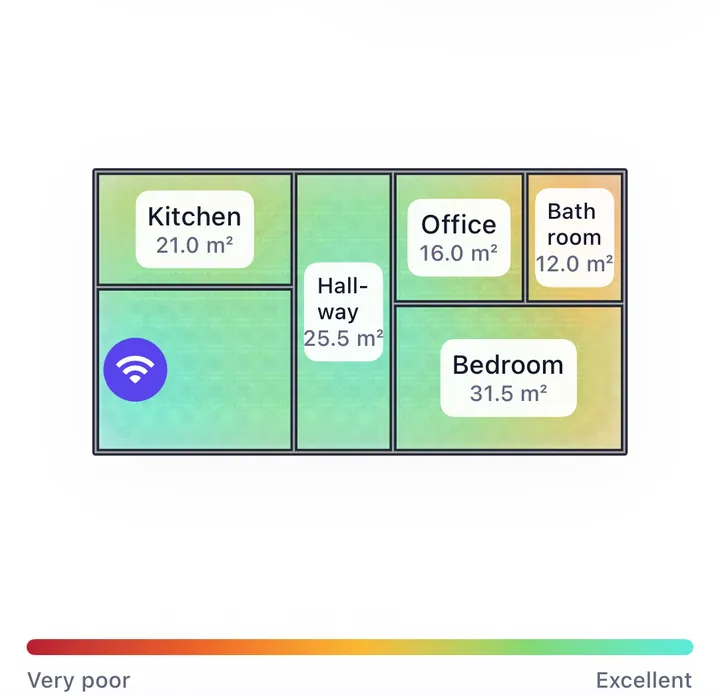
In this demo house, the three weak rooms sit on the same side, so one unit in the hallway lifts the whole map from 51 to 76. The bathroom in the far corner only reaches 45: one unit rarely fixes every corner, and a second one there would be a small gain for its cost.
More units aren't automatically better. With wireless backhaul, each unit that relays through another adds delay and shares speed again, so a chain of three wireless hops can end up slower than two well-placed units. Manufacturers give placement limits for this reason: eero, for example, recommends that wireless units be no more than about 15 metres (50 feet) apart.
Where the new unit goes
Wherever it is, a wireless unit can only pass on the signal it receives. That's why it belongs roughly halfway between the router and the weak area, not inside the weak room. Where to put a mesh node explains how to find the spot with a few readings.
When to skip both
If a cable can reach the far room or the floor above, an access point on that cable beats any wireless unit, at a lower cost. And if the problem is one device that never moves, like a TV or a games console, a cable to that device fixes it without any new Wi-Fi at all.