
What blocks Wi-Fi at home: walls, floors, metal and water
A plasterboard wall costs almost nothing. Twenty centimetres of concrete can cost more than everything else in the house. Here are the measured numbers, and how to spot the wall that matters in your home.
In short
- In lab measurements by NIST, plasterboard and plywood cost about 1 dB, brick about 6 dB, and 20 cm of reinforced concrete about 31 dB at 2.4 GHz. Every 3 dB halves the signal.
- 5 GHz loses much more through heavy walls than 2.4 GHz: 55 dB instead of 31 for the same concrete wall.
- Metal and water aren't in the lab table but matter just as much: fridges, radiators, mirrors, aquariums, floors with underfloor heating.
- To find the wall that matters, read the signal a step before and a step after it. A drop of 15 dB or more across one wall means that wall is your problem.
On this page
Wi-Fi weakens with every metre and every obstacle, but the obstacles aren't equal. In most homes one or two walls or objects do nearly all the damage, and once you know which they are, it's usually clear where the router should go or where a second access point is needed.
What the measurements say
The most cited measurements come from NIST, the US standards institute, which tested common building materials in its lab in 1997 (report NISTIR 6055). Converted to Wi-Fi frequencies, they look like this:
| Material | Loss at 2.4 GHz | Loss at 5 GHz |
|---|---|---|
| Plasterboard, plywood | about 1 dB | about 1 dB |
| Glass (6 mm, uncoated) | 1 dB | 1 dB |
| Solid wood (38 mm) | 3 dB | 4 dB |
| Brick | 6 dB | 15 dB |
| Masonry block | 11 dB | 15 dB |
| Concrete, 10 cm | 15 dB | 22 dB |
| Concrete, 20 cm | 29 dB | 48 dB |
| Reinforced concrete, 20 cm | 31 dB | 55 dB |
Source: NIST, Electromagnetic Signal Attenuation in Construction Materials (1997), values at Wi-Fi frequencies as summarised by Wi-Fi Vitae.
To read these numbers, remember that decibels multiply: 3 dB halves the signal, 10 dB leaves a tenth, 20 dB a hundredth, 30 dB a thousandth. A plasterboard partition is practically free. A 20 cm concrete wall leaves about a thousandth of the signal at 2.4 GHz, and far less at 5 GHz.
These are lab samples. Real walls vary with moisture, what's inside them and how they were built, and professional installers expect differences of around 10 dB either way. The order, though, is reliable: light partitions barely matter, masonry matters, concrete and especially reinforced concrete matter a lot.
Why 5 GHz suffers more
Look at the two columns: brick costs 6 dB at 2.4 GHz and 15 dB at 5 GHz; reinforced concrete costs 31 and 55. The higher frequency is faster when the signal is good, but it gives up much sooner behind heavy walls.
That has a practical consequence. A device behind a thick wall can be steadier on 2.4 GHz even though 5 GHz is the "better" band. If your router uses one name for both bands and the device keeps choosing badly, see 2.4 or 5 GHz.
What isn't in the table
Metal reflects radio rather than absorbing it, and leaves a shadow behind it. In a home that means fridges and freezers, ovens, washing machines, radiators, metal shelving, lift shafts, and mirrors, whose reflective coating is a thin metal layer. Coated windows designed to keep heat in work the same way.
Water absorbs Wi-Fi frequencies well. A full fridge, an aquarium, large plants and even a room full of people take a noticeable share of the signal.
Floors are often the heaviest barrier in the house: a concrete slab, sometimes with underfloor heating pipes or a foil-backed insulation layer, crossed at an angle. They have their own guide: Wi-Fi weak upstairs.
Kitchens and bathrooms combine several of these. A bathroom has tiles on masonry, pipes and often a mirrored cabinet; a kitchen has a fridge, an oven, metal-framed units and tiles. If either sits between the router and a bedroom, it's often the whole reason the bedroom is weak.
The microwave oven
A microwave oven heats food with radio energy at about 2.45 GHz, inside the 2.4 GHz Wi-Fi band. Its metal box and door mesh keep almost all of it in, but even a tiny fraction of that power is strong next to a Wi-Fi signal. The effect is easy to recognise: it only touches 2.4 GHz, only near the kitchen, and only while the oven runs. If the connection falls apart exactly while you heat something and recovers when it stops, that's the cause; moving the router or the affected device away from the kitchen, or using 5 GHz, solves it. Does the microwave interfere with Wi-Fi? shows how to confirm it in a minute.
Finding the wall that matters in your home
You don't need to know what your walls are made of. You need to know where the signal drops.
Take a signal reading a step before the wall you suspect and a step after it. Wi-Fi not reaching one room explains how to read the signal in dBm on iPhone, Mac and Android.
- If the reading drops by a few dB across the wall, the wall isn't your problem; distance is.
- If it drops by 15 dB or more in one step, that wall is doing most of the damage.
A map of the whole home shows the same thing as a sharp edge in the colours. In this demo house, the two rooms on the router's side score 90 and 71, and the two rooms directly behind a thick central wall score 32 and 22:
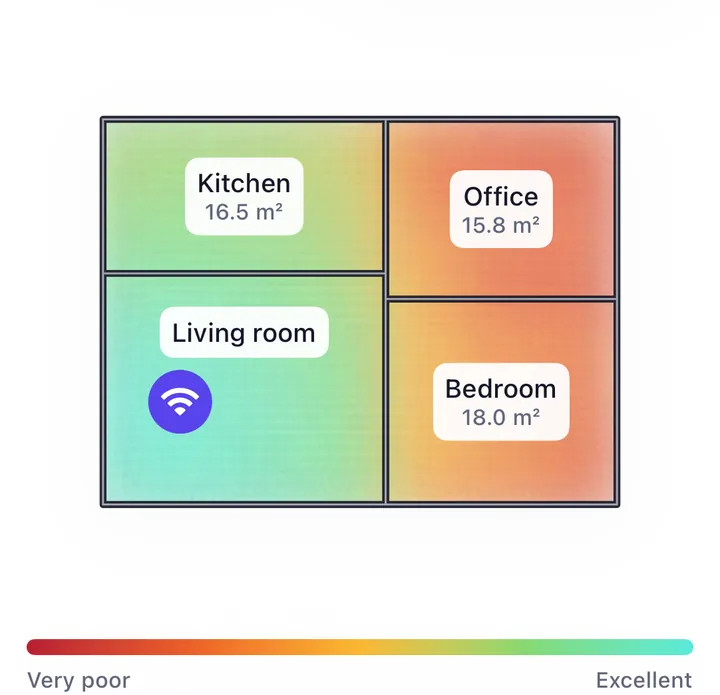
The rooms behind the wall aren't much further from the router. They're behind the wrong material. If you use a map like this, take readings close to both sides of the wall itself: the colours between your measurements are estimated, and the estimate can't see walls.
What to do about a heavy wall
You can't push through it. Transmit power is capped by regulation, and a reinforced wall costs the same 30 dB whatever router stands in front of it. What works is going around it.
Use the doorways. A signal that reaches a room through an open door and along a corridor loses far less than one that crosses masonry. Sometimes moving the router a metre or two puts the doorway on the straight line to the room that matters.
Put the router on the right side. If most of the rooms you use are behind the wall, the router belongs there, even if the line enters on the other side. A long Ethernet cable through a doorway or along the skirting board gets it across. See where to put the router.
Move small obstacles near the router. An aquarium, a mirror or a metal shelf right next to the router blocks the signal before it has spread out, and they're easy to shift.
Add an access point on the other side. Connected by cable, it doesn't care about the wall at all. A mesh node works too, as long as it sits where it still receives the router well, typically on the router's side of the wall or in a doorway. See mesh or extender.