
Where to put the router for better Wi-Fi at home
The router usually sits where the internet line happens to enter the home. Moving it costs nothing or the price of a cable, and it changes coverage more than any setting.
In short
- Put it near the middle of the rooms you use, not in the corner where the line comes in. A long Ethernet cable from the socket gets it there.
- Keep it off the floor and out of cabinets, at about the height where you use your devices or a little above, and away from metal, water and other radio devices.
- With external antennas: all vertical for one floor; angle them about 30° if you need another floor.
- Check the result with a signal reading in the rooms that matter, before and after the move.
On this page
The router is almost never where it should be. It sits where the internet line comes into the home, which is usually by the front door, in a hallway cupboard or in a corner of the living room, because that's where the installer found the socket. Nobody chose that spot for the Wi-Fi.
Moving it is the first thing to try when coverage is uneven, and often the only thing you need. Here's how to choose a better spot and how to check that it really is better.
The middle of the rooms you use
A router sends its signal out in every direction. Against an outside wall or in a corner, a large part of it goes outdoors or into the neighbour's flat, and the room at the far end of the home sits behind every wall in between. AVM, the company that makes the FRITZ!Box, puts it simply in its own guidance: a central room, never directly in a corner.
"Central" doesn't mean the geometric centre of the floor plan. It means the middle of the rooms where you actually need Wi-Fi. If the study and the living room matter and the box room doesn't, lean toward the study and the living room. In a long apartment that usually means the hallway halfway along; in a house on two floors, see Wi-Fi weak upstairs, because the floor changes the answer.
How high
Two things matter here, and they pull in slightly different directions.
The first is to get the router off the floor. Furniture, beds, sofas and people mostly sit between the floor and waist height. A router on the floor, or on the bottom shelf of a TV unit, sends its signal straight into all of it.
The second is that a router's antennas are strongest on their own level. TP-Link's guidance recommends a moderate height so the router sits on roughly the same plane as the devices you use, and its own test shows a phone getting a stronger signal when it's held at the router's height.
In practice: a sideboard, a desk or a shelf at roughly table to chest height works well for a single floor. Going higher, to the top of a tall bookcase, helps when you need to clear a lot of furniture or reach the floor above, at the cost of slightly less signal right below the router. Don't mount an ordinary router upside down on the ceiling; ceiling access points are designed to point down, regular routers aren't.
What to keep around it
Small objects right next to the router matter more than large ones across the room, because they block the signal before it has spread out. Keep away from:
- Metal: radiators, metal shelving, the back of a TV, a metal cabinet.
- Water: a fridge, an aquarium, even large plants, which AVM lists explicitly.
- Other radio devices: the microwave oven, wireless speakers and other Bluetooth devices, which share the 2.4 GHz band.
- Closed cabinets: a thin wooden door costs little on its own, but a cabinet usually means the router is also low, against a wall and surrounded by other electronics.
If you're not sure whether the cabinet matters in your home, test it: take a signal reading in your worst room, then open the cabinet door or put the router on top of it, wait a minute, and take the reading again in the same spot. A clear improvement means the cabinet was part of the problem; router in a cabinet has ways to hide it without losing coverage.
The antennas
If your router has external antennas, they radiate mostly sideways, in a ring around the antenna, and weakly along its length. That's why the direction matters.
TP-Link's recommendation, with its own measurements: vertical antennas when you need coverage on one floor, and an angle of about 30° when the signal has to reach another floor. In its test, the same iPhone on the router's level read -26 dBm with the antennas vertical, -35 dBm with them tilted to 45°, and -39 dBm with them horizontal. Tilting costs some signal on your own floor to gain some above or below, so only do it if you need the other floor.
Routers with internal antennas have nothing to adjust. Place them the way the manufacturer intended, standing up or lying flat; turning a standing router on its side changes how its antennas point.
Getting the router there
The line has to come in where it comes in. The Wi-Fi doesn't have to stay there.
The simplest way is a long Ethernet cable from the line socket to the new spot. Fifteen or twenty metres of flat cable runs under rugs and along skirting boards and costs very little.
If your provider's box has to stay by the socket, you can still move the Wi-Fi: connect your own router or an access point to the box with that cable, put it in the better spot, and turn off the Wi-Fi on the provider's box, so your devices don't stay connected to the one in the wrong place.
If a cable really can't pass, powerline adapters can carry the connection over the electrical wiring. How well they work depends on the house, so buy them somewhere you can return them.
Check that the new spot is really better
Before you drill anything, run a temporary cable across the floor and leave the router in its new place for a day. Then compare: take a signal reading in each room that matters, in the same spot you used before, at the time of day you normally use it. Wi-Fi not reaching one room explains how to read the signal on iPhone, Mac and Android.
On a map of the whole home, a good move looks like this. In this demo apartment the router goes from the front door to the middle of the corridor:
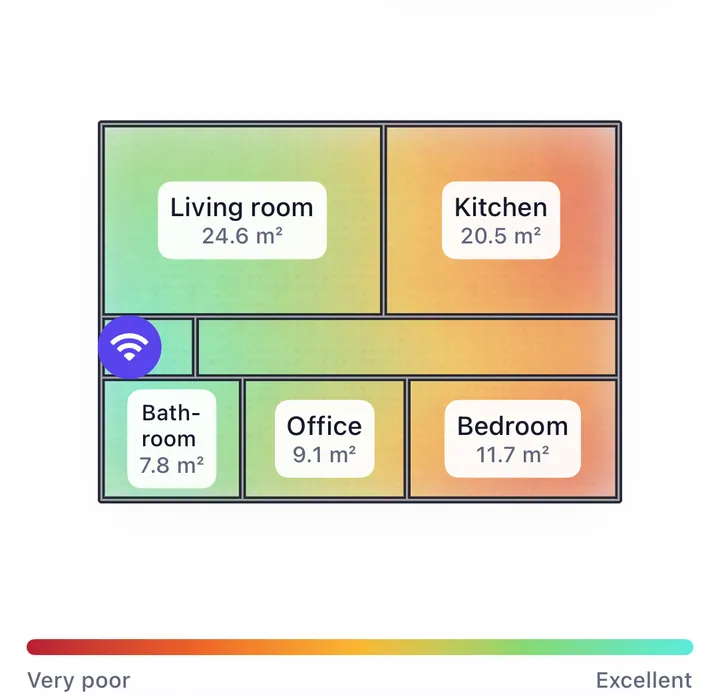
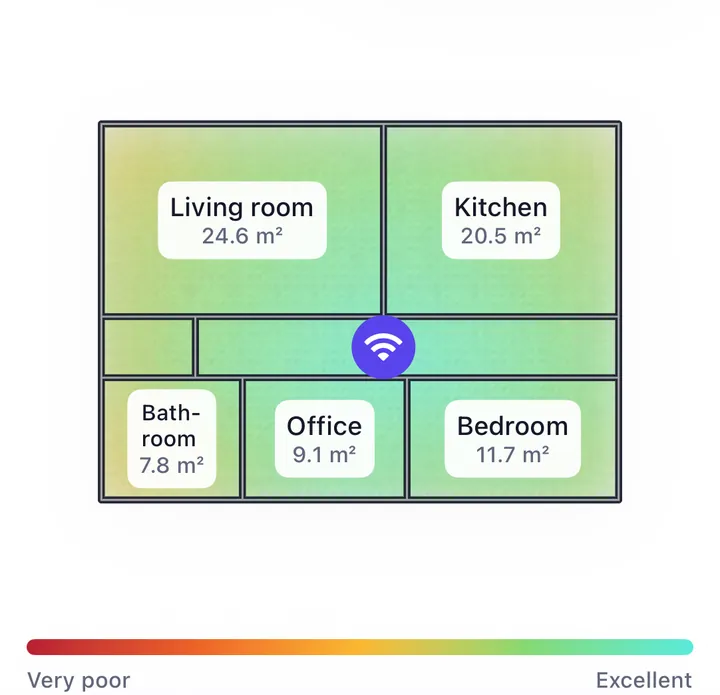
The bedroom at the far end goes from 30 to about 75, and the entrance drops from nearly perfect to 66. That's what you want from a central router: it gives up signal where you had more than you needed and moves it to where you were short.
If no single spot covers all the rooms you need, the next step is a second access point rather than a different router. Mesh or extender explains the options.